
Thursday, 22Oct 2026
Software Rollout Training: How to Design eLearning That Gets Employees Productive on a New System from Day One
A new core banking platform, an ERP…

Thursday, 16Apr 2026
Rapid eLearning development challenges are the silent productivity killers that most L&D teams encounter but rarely talk about openly. You have a training deadline looming, a subject matter expert who’s impossible to reach, a content library that’s way too large, and a learner base with very different needs. Sound familiar?
Rapid eLearning promises speed without sacrificing quality — but in practice, that balance is harder to strike than it looks. The good news is that each challenge has a clear, actionable solution. This blog breaks down the most common rapid eLearning development challenges your team will face and gives you a practical roadmap to overcome every one of them.
Before diving into solutions, it helps to understand why rapid eLearning development feels so chaotic for so many teams.
Traditional eLearning development can take months. Rapid eLearning compresses that timeline to days or weeks. That compression doesn’t eliminate the complexity — it simply concentrates it. Teams are still expected to conduct needs analysis, gather and filter content, collaborate with stakeholders, design engaging interactions, ensure accessibility, and run quality checks. They just have to do it faster.
The result? Corners get cut in the wrong places. Courses get published with bloated content, poor learner experience, or technical glitches that erode trust in your training program entirely.
Understanding the root causes of rapid eLearning development challenges is the first step toward building a smarter, more resilient development process.
One of the most pervasive rapid eLearning development challenges is being handed an impossible deadline. Business stakeholders often request training “as soon as possible,” without a realistic understanding of what course development actually involves.
The instinctive response is to rush — to start building before you’ve finished planning. This almost always backfires. Courses built under extreme time pressure tend to lack clear learning objectives, have inconsistent visual design, and fail to achieve measurable learner outcomes.
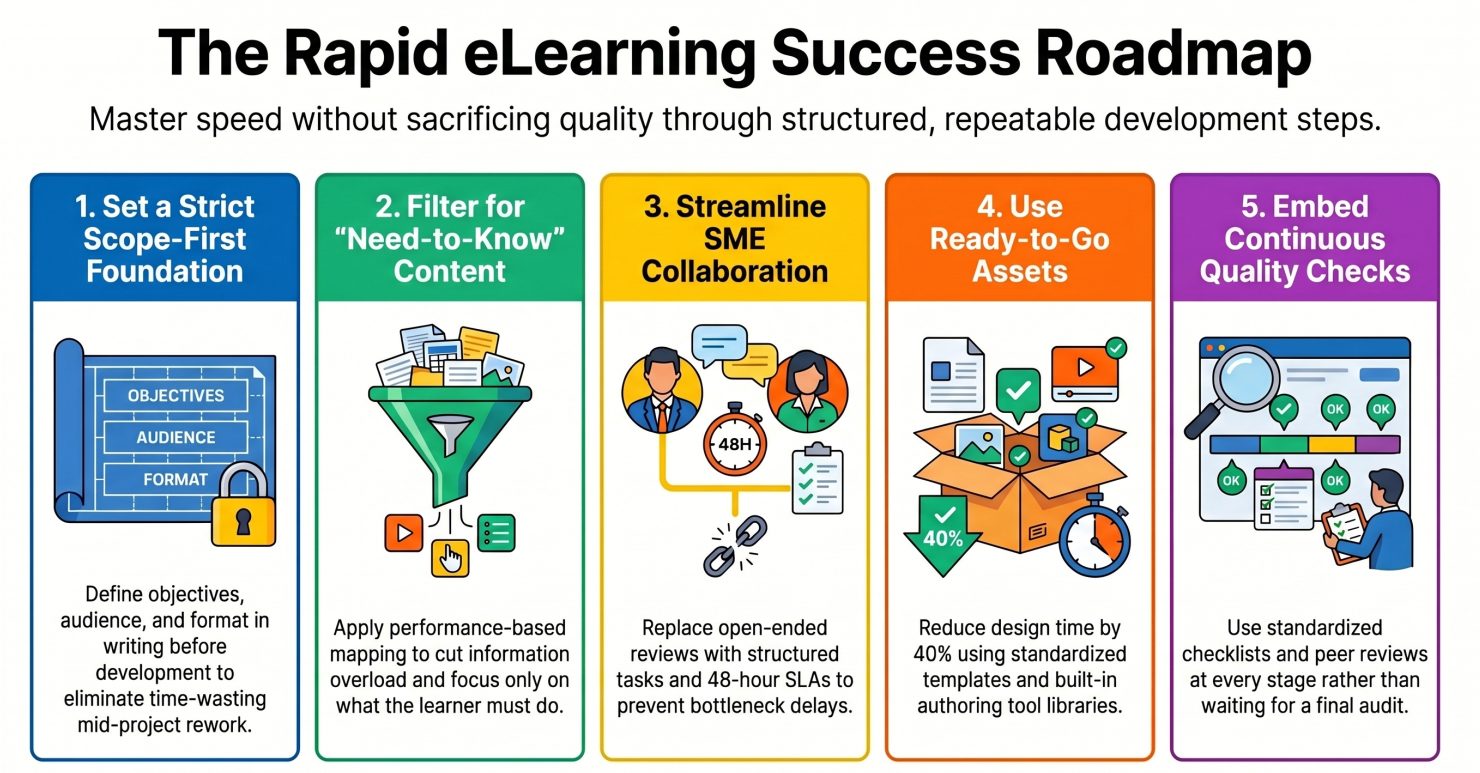
The most effective solution is to implement a scope-first approach before a single slide is built. This means defining, in writing, the learning objectives, target audience, course length, and delivery format before any development begins. When scope is agreed upon upfront, you dramatically reduce the risk of mid-project rework — which is one of the biggest hidden time wasters in rapid eLearning development.
Standardised course templates are another powerful time-saver. Instead of redesigning layouts, interactions, and navigation flows for every new project, maintain a library of pre-approved templates for common course types: compliance training, product knowledge, onboarding, and so on. This approach can reduce design and development time by 30–40% on repeat course types.
For teams under chronic deadline pressure, outsourcing to a specialised eLearning vendor is worth serious consideration. A vendor with an established development pipeline can absorb surge demand without the quality drop that comes from overwhelming an in-house team.
Another major rapid eLearning development challenge is content volume. Subject matter experts and stakeholders almost always over-share. You receive hundreds of pages of documentation, slide decks, videos, and process guides and are expected to turn all of it into a concise, engaging course.
Including too much content is one of the most common and damaging mistakes in rapid eLearning development. Cognitive overload kills retention. When learners are bombarded with information, they don’t learn more — they learn less.
Apply the “need-to-know vs. nice-to-know” filter rigorously. Every piece of content should be evaluated against the stated learning objectives. If it doesn’t directly contribute to a measurable learning outcome, it doesn’t belong in the course.
A useful framework here is performance-based content mapping. Rather than asking “What does the learner need to know?”, ask “What does the learner need to do differently after this training?” This keeps the focus on behavioural outcomes and makes it much easier to eliminate content that’s interesting but not instructionally necessary.
Chunk the remaining content into microlearning modules — short, focused bursts of 3–7 minutes that target one learning objective at a time. This approach improves completion rates, supports mobile learning, and makes future content updates far more manageable.
Of all the rapid eLearning development challenges, SME bottlenecks are among the most frustrating — because they’re largely outside your direct control. SMEs are busy professionals who often view content reviews as an interruption to their “real” work, not a priority.
The consequences are severe: delayed reviews, incomplete feedback, and content that gets approved without being properly validated — only to require corrections after launch.
The key is to reduce friction in the SME collaboration process. This means giving SMEs structured, easy-to-complete review tasks rather than asking them to review an entire course as a whole. Break feedback requests into focused questions: “Does this scenario accurately reflect the process?” rather than “Does this look right?”
Create a structured SME interview guide before your first conversation. Come prepared with specific questions tied to learning objectives so that every minute with the SME is productive. Record these sessions (with permission) so you can refer them later without needing follow-up calls.
Establish a defined review turnaround SLA with stakeholders early. When SMEs and their managers know that a 48-hour review window has been agreed to, delays become accountable rather than chronic.
For technical or compliance-heavy content, consider creating a content accuracy checklist that SMEs can validate quickly rather than having to read and critique a full course narrative.
Many teams underestimate how significantly tool selection affects their ability to navigate rapid eLearning development challenges. The wrong tool creates its own friction — slow publishing cycles, limited interactivity, poor responsive design, or a steep learning curve that defeats the purpose of “rapid” development.
Start by mapping your core development requirements before evaluating any tool. Consider factors like: Does your course need to be SCORM-compliant? Will learners access it on mobile? Do you need advanced branching scenarios or is simple linear navigation sufficient?
For pure speed, tools like Articulate Rise and iSpring offer pre-built interactive layouts that let developers build polished courses quickly without requiring advanced design skills. For more complex branching and custom interactions, Articulate Storyline or Adobe Captivate offer greater flexibility, albeit with a steeper learning curve.
Pay close attention to collaboration features. In rapid eLearning development, multiple stakeholders often need to review and comment on a course simultaneously. Tools that support in-app review workflows (such as Articulate Review 360) can eliminate rounds of email-based feedback and shave days off your review cycle.
Also evaluate the tool’s template and asset library. The richer the built-in library of slide layouts, characters, icons, and interactions, the less time your team spends on visual design from scratch.
A rapid eLearning development challenge that often gets overlooked until it’s too late is learner diversity. Your audience is rarely homogenous. Some learners are digital natives who want mobile-first, interactive experiences. Others prefer structured, text-based content they can read at their own pace. Some are on the shop floor with limited screen time; others are desk-based with uninterrupted access.
Designing for this diversity without a clear strategy leads to courses that work adequately for some learners and poorly for others.
Ground your course design in adult learning principles — specifically, the principle that adults learn best when training is relevant, self-directed, and immediately applicable to their work. This means building in scenarios and examples drawn directly from the learner’s real work context, not generic business analogies.
Use multimodal content design: deliver the same core concept through a short explanatory paragraph, a visual diagram, a scenario-based question, and a brief video or animation. This accommodates different learning preferences without requiring separate course versions.
Run a learner needs analysis before development begins, even a simple one. A short pulse survey asking about device preference, prior knowledge, and biggest on-the-job challenges gives you data that directly improves course relevance and reduces redesign after launch.
Design for mobile-first as your default assumption. Responsive design is no longer optional — if your course isn’t functional on a smartphone, you’ve already excluded a significant portion of your learner population.
The rapid eLearning development landscape is evolving faster than most L&D teams can track. AI-powered authoring tools, automated translation platforms, synthetic voiceovers, and generative video tools are reshaping what’s possible — and how quickly it can be done. Ignoring these technologies means leaving significant efficiency gains on the table.
Dedicate deliberate time — even just 2–3 hours per month — to technology scouting. Follow L&D industry publications, attend virtual conferences, and maintain a document of tools your team has evaluated or wants to evaluate.
AI-powered video creation tools are particularly high-value for rapid eLearning development. These tools allow L&D teams to convert text scripts into professional-quality video content with AI-generated presenters, voiceovers, and captions — eliminating the time and cost of traditional video production.
AI translation and localisation tools have also matured significantly. Modern platforms can translate on-screen text, generate multilingual voiceovers, and sync subtitles automatically — compressing a localisation project that once took weeks into a matter of days.
When evaluating any new technology, apply a simple ROI filter: Will this tool save meaningful time on a task we repeat frequently? Will it maintain or improve course quality? If yes, invest in a proper pilot before full adoption.
Perhaps the most consequential of all rapid eLearning development challenges is maintaining quality when you’re resource-constrained. With tight deadlines and small teams, quality assurance is often the first thing to get compressed — and learners notice.
Poor quality shows up as: factual errors that undermine credibility, broken interactions that frustrate learners, inconsistent visual design that looks unprofessional, and inaccessible content that excludes learners with disabilities.
Build quality into the development process itself rather than treating it as a final-stage activity. This means using a standardized course development checklist that covers instructional design, visual design, technical functionality, and accessibility at each stage of production — not just at the end.
Implement peer review as a structural requirement, not an optional extra. Even a 30-minute review by a colleague who wasn’t involved in building the course will catch errors that the original developer has become blind to.
For teams with limited in-house QA capacity, stakeholder sign-off stages serve a dual purpose: they catch content errors and build stakeholder ownership of the final product, reducing the risk of post-launch change requests.
Maintain a resource prioritization matrix: when resources are genuinely scarce, be explicit about where quality is non-negotiable (factual accuracy, accessibility, key interactions) versus where you can simplify (visual embellishment, advanced animations, supplementary content).
Rapid eLearning development challenges don’t disappear by wishing for more time or a bigger team. They’re managed through deliberate process design, the right tool stack, structured collaboration with SMEs and stakeholders, and a clear-eyed understanding of what quality means at each phase of development.
The teams that consistently deliver high-quality eLearning at speed share a common trait: they’ve invested time upfront in building repeatable systems. Templates, SME frameworks, QA checklists, and technology evaluations aren’t overhead — they’re the infrastructure that makes rapid development genuinely rapid.
If your team is regularly struggling with any of the rapid eLearning development challenges described above, the answer isn’t to work harder. It’s to work more deliberately, with systems that protect quality even when timelines compress.
Start with the one challenge that’s causing the most pain on your current project. Apply the solution framework described here. Then build from there — because a more resilient rapid eLearning development process is built one improvement at a time.
Thursday, 22Oct 2026
A new core banking platform, an ERP…

Monday, 19Oct 2026
Almost every employee has done it. You…

Thursday, 15Oct 2026
Engaging Technical Training Starts with a Simple…
Thursday, 22Oct 2026
A new core banking platform, an ERP…
Monday, 19Oct 2026
Almost every employee has done it. You…
Thursday, 15Oct 2026
Engaging Technical Training Starts with a Simple…
Thursday, 22Oct 2026
A new core banking platform, an ERP upgrade, a fresh CRM for the sales team or a new claims system for an insurer: every organisation goes through system changes, and…
Read More line_end_arrow_notch
Monday, 19Oct 2026
Almost every employee has done it. You open the annual compliance course, click "Next" until the quiz appears, guess your way to a pass mark, and close the window. Box…
Read More line_end_arrow_notch
Thursday, 15Oct 2026
Engaging Technical Training Starts with a Simple Shift Engaging technical training begins when employees stop seeing training as information they have to complete and start seeing it as knowledge they…
Read More line_end_arrow_notch