
Thursday, 22Oct 2026
Software Rollout Training: How to Design eLearning That Gets Employees Productive on a New System from Day One
A new core banking platform, an ERP…

Thursday, 19Mar 2026
Cognitive Load in K-12 eLearning has become a critical consideration as publishers and EdTech companies expand their digital curriculum offerings. While interactive animations and multimedia elements have transformed how students engage with learning content, excessive visual stimulation can unintentionally hinder comprehension rather than improve it.
In many digital learning environments, the emphasis on visual engagement has led to modules filled with transitions, animated characters and multiple simultaneous elements. Although these features may appear attractive and engaging, they can overwhelm young learners who are still developing the cognitive capacity required to process complex information.
Understanding Cognitive Load in K-12 eLearning is therefore essential for organisations that want to create digital learning experiences that are both engaging and pedagogically effective.
Cognitive load refers to the amount of mental effort required for a learner to process information. In educational psychology, cognitive load theory explains that the human brain has limited working memory capacity. When too much information is presented at once, the learner struggles to retain and organise the material effectively.
In the context of Cognitive Load in K-12 eLearning, this limitation becomes particularly important because young learners are still developing foundational cognitive skills. Their ability to filter distractions and focus on essential information is significantly lower than that of adult learners.
When digital modules introduce excessive visual stimuli, students may focus on animation or decorative elements rather than the underlying concept being taught. As a result, the intended learning outcome is weakened.
Animations play an important role in modern eLearning environments. When used appropriately, they can simplify complex ideas and make abstract concepts easier to understand.
For example, animations can help explain:
When aligned with instructional objectives, animations support conceptual clarity. However, the challenge arises when animation becomes the primary design driver rather than a supporting element.
In such situations, Cognitive Load in K-12 eLearning increases because learners must process multiple moving elements while simultaneously trying to understand new concepts.
To better understand Cognitive Load in K-12 eLearning, it is helpful to examine the three types of cognitive load identified in learning science.
Intrinsic cognitive load relates to the inherent difficulty of the subject matter. Some topics naturally require more mental effort to understand. For example, solving algebraic equations involves higher intrinsic load than recognising basic shapes.
Digital learning design cannot eliminate intrinsic load, but it can structure content in a way that makes complex ideas easier to process.
Extraneous cognitive load is created by the way information is presented. Poorly designed learning materials can introduce unnecessary complexity that distracts from the main concept.
In many digital modules, excessive animation, decorative graphics and irrelevant sound effects increase extraneous cognitive load. This is where problems in Cognitive Load in K-12 eLearning often emerge.
Germane cognitive load refers to the mental effort learners invest in building meaningful understanding. Instructional design should aim to maximise germane load while minimising extraneous distractions.
Well-designed digital modules guide learners through concepts in a way that strengthens comprehension and retention.
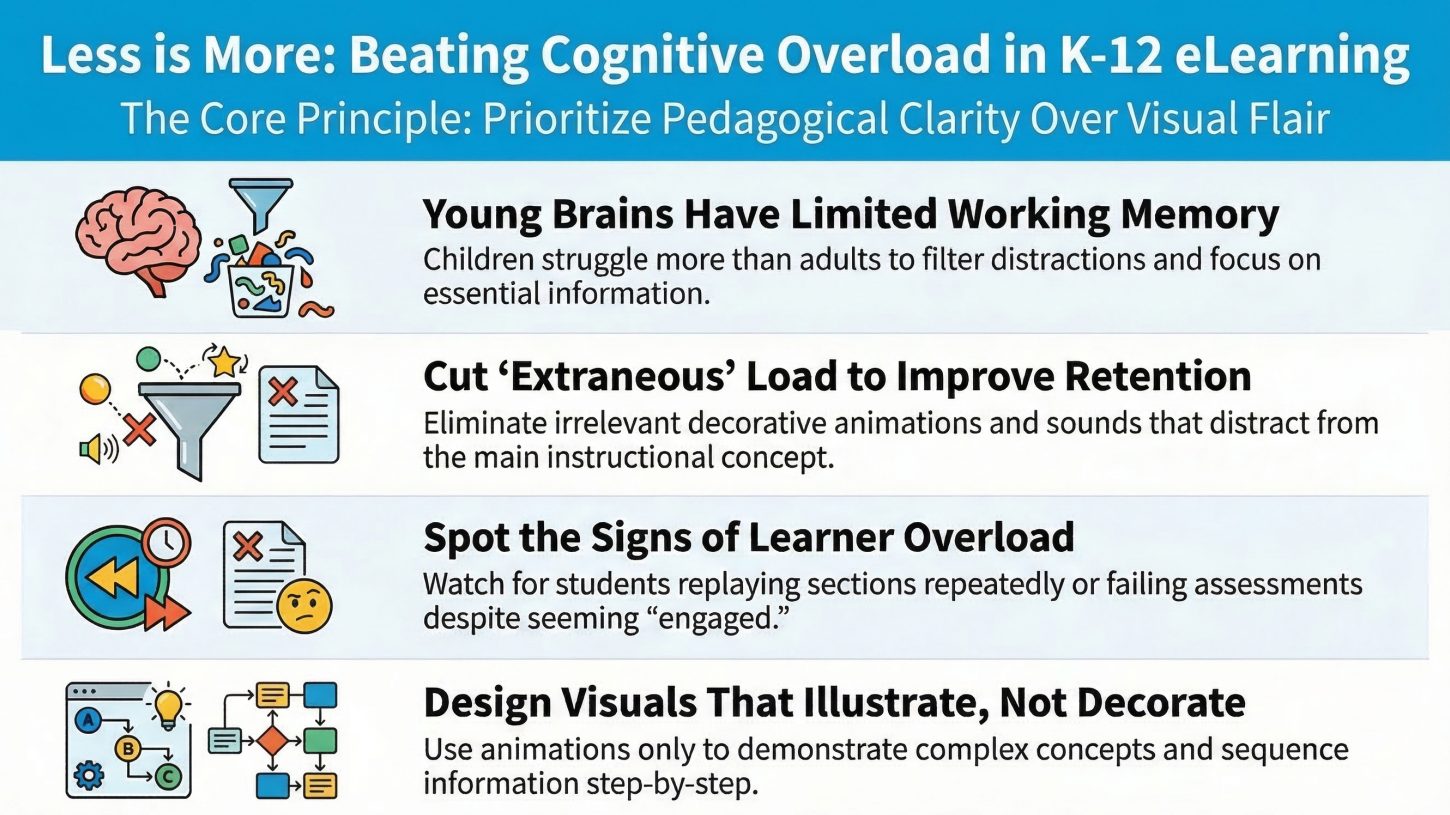
Many digital learning modules attempt to increase engagement through visual effects. However, when animation is used excessively or without instructional purpose, it can interfere with learning.
Several design patterns commonly increase Cognitive Load in K-12 eLearning.
Multiple moving elements on the screen can compete for the learner’s attention. Young learners may struggle to identify which element is most important.
Animations that are not directly related to the concept being taught can distract learners from the instructional content.
Frequent scene changes or transitions can interrupt cognitive processing and prevent learners from fully understanding the concept.
Screens containing text, animations, icons and narration simultaneously require learners to process too many inputs at once.
When these factors combine, learners may focus on visual features rather than conceptual understanding.
Educators and publishers can identify problems related to Cognitive Load in K-12 eLearning by observing learner behaviour and performance.
Common indicators include:
These signs suggest that learners may have experienced excessive cognitive load during the digital learning experience.
Reducing Cognitive Load in K-12 eLearning does not mean eliminating animation or visual engagement. Instead, it involves applying instructional design principles that ensure visual elements support learning rather than compete with it.
Concept explanations should remain the central focus of every digital module. Visual elements should be used only when they enhance understanding.
Animations should directly demonstrate the concept being taught. For example, showing how fractions divide a shape is far more effective than using unrelated animated characters.
Presenting fewer elements on the screen allows learners to concentrate on essential information.
Introducing concepts step by step prevents learners from becoming overwhelmed.
Visual elements should reinforce spoken explanations rather than introduce new information simultaneously.
By applying these principles, designers can reduce unnecessary distractions and maintain an optimal balance between engagement and comprehension.
Effective management of Cognitive Load in K-12 eLearning requires collaboration between instructional designers, subject matter experts and visual designers.
Instructional designers analyse curriculum objectives and structure learning pathways. Subject matter experts ensure conceptual accuracy. Visual designers translate these frameworks into engaging digital experiences.
When instructional design leads the development process, animation becomes a strategic learning tool rather than a decorative feature.
This approach allows digital modules to remain engaging while maintaining strong pedagogical foundations.
As digital learning becomes increasingly integrated into school curricula, the effectiveness of eLearning modules will significantly influence student learning outcomes.
If digital modules prioritise visual appeal without considering Cognitive Load in K-12 eLearning, students may experience short-term engagement but limited knowledge retention.
Conversely, when cognitive load principles guide digital curriculum design, learners benefit from clearer explanations, better concept retention and more meaningful engagement.
For publishers and EdTech companies, understanding these principles is essential for building sustainable digital learning ecosystems.
The rapid growth of digital learning has brought new opportunities for innovation in K-12 education. Interactive animations, simulations and multimedia content can make learning more engaging and accessible than ever before.
However, without careful instructional design, these same features can increase Cognitive Load in K-12 eLearning, reducing students’ ability to absorb and retain knowledge.
Balancing engagement with cognitive clarity is therefore one of the most important responsibilities in digital curriculum development. When animation is used purposefully and guided by learning science, it becomes a powerful tool for enhancing understanding rather than distracting from it.
At Learning Owl, we design K-12 digital learning solutions with a strong focus on instructional design and cognitive learning principles. By carefully managing Cognitive Load in K-12 eLearning, our approach ensures that animations, interactions and visual elements support meaningful learning outcomes.
Through pedagogy-first content development, structured storyboarding and scalable production frameworks, Learning Owl helps publishers transform traditional curriculum into engaging digital learning experiences without compromising instructional integrity.
If your organisation is exploring curriculum digitisation, applying cognitive load principles can be the key to building effective and scalable eLearning systems.
Cognitive Load in K-12 eLearning refers to the amount of mental effort students use to process and understand digital learning content. Since learners have limited working memory capacity, poorly designed modules with too many visual elements, animations or instructions can overwhelm them. Effective eLearning design minimises unnecessary distractions so students can focus on understanding key concepts.
Cognitive load is important because it directly affects how well students absorb and retain information. When Cognitive Load in K-12 eLearning is too high, learners struggle to process new information, which reduces comprehension and retention. Well-designed digital modules manage cognitive load by presenting concepts gradually and using visuals only when they support learning.
Excessive animation increases Cognitive Load in K-12 eLearning by introducing multiple moving elements that compete for the learner’s attention. When students focus on animations instead of the concept being explained, their working memory becomes overloaded. This makes it harder for them to understand and remember the lesson.
Learning science identifies three types of cognitive load:
Intrinsic Cognitive Load – the inherent difficulty of the concept being learned.
Extraneous Cognitive Load – mental effort caused by poor instructional design or unnecessary visuals.
Germane Cognitive Load – mental effort used to build meaningful understanding.
Managing Cognitive Load in K-12 eLearning requires reducing extraneous load while supporting germane load.
How can instructional designers reduce cognitive load in K-12 eLearning?
Instructional designers can reduce Cognitive Load in K-12 eLearning by:
These strategies help learners focus on the most important information.
Indicators of high Cognitive Load in K-12 eLearning include:
These signs suggest the learning design may be overwhelming students.
Yes, animations can improve learning when used correctly. In Cognitive Load in K-12 eLearning, animations should illustrate processes, demonstrate movement or simplify abstract concepts. When animations directly support the explanation, they enhance understanding. However, excessive or irrelevant animations can distract learners and increase cognitive load.
The ideal balance occurs when digital modules are visually engaging but instructionally clear. Managing Cognitive Load in K-12 eLearning means using animations, interactions and multimedia elements strategically while ensuring the core concept remains the focus of the lesson.
Publishers digitising curriculum must consider Cognitive Load in K-12 eLearning because digital environments introduce many visual and interactive elements. Without careful instructional design, these features can overwhelm learners. Managing cognitive load ensures that digital curriculum improves comprehension rather than distracting from learning.
Pedagogy-first design ensures that instructional objectives guide every aspect of module development. When pedagogy leads the process, visual design and animations are used only to support learning. This approach helps maintain optimal Cognitive Load in K-12 eLearning while delivering engaging digital experiences.
Thursday, 22Oct 2026
A new core banking platform, an ERP…

Monday, 19Oct 2026
Almost every employee has done it. You…

Thursday, 15Oct 2026
Engaging Technical Training Starts with a Simple…
Thursday, 22Oct 2026
A new core banking platform, an ERP…
Monday, 19Oct 2026
Almost every employee has done it. You…
Thursday, 15Oct 2026
Engaging Technical Training Starts with a Simple…
Thursday, 22Oct 2026
A new core banking platform, an ERP upgrade, a fresh CRM for the sales team or a new claims system for an insurer: every organisation goes through system changes, and…
Read More line_end_arrow_notch
Monday, 19Oct 2026
Almost every employee has done it. You open the annual compliance course, click "Next" until the quiz appears, guess your way to a pass mark, and close the window. Box…
Read More line_end_arrow_notch
Thursday, 15Oct 2026
Engaging Technical Training Starts with a Simple Shift Engaging technical training begins when employees stop seeing training as information they have to complete and start seeing it as knowledge they…
Read More line_end_arrow_notch